
This article was originally published by Skuid.
It’s no secret that adopting any enterprise application is a risk, and customer relationship management (CRM) systems are no exception. In fact, nearly two decades of research by multiple analysts shows that anywhere from 20-70% of CRM projects fail.
Those CRM failure statistics put fear in the hearts of anyone in charge of CRM-system success. Not only would a failed project mean wasted time and money, it could even cost you your job.
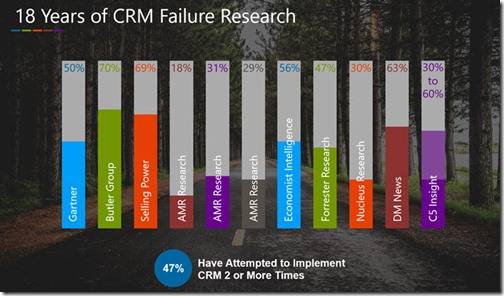
Despite these challenges, CRM adoption isn’t slowing down—quite the opposite. A recent report from Fortune Business Insights predicts that the global CRM market will be worth $128.97 billion by 2028, up from $58.04 billion in 2021. According to Grand View Research, over 91% of companies that employ more than 10 people use a CRM tool.
And CRM solutions can provide significant value, especially for today’s agile, data-driven, and forward-looking sales teams. According to the most recent Salesforce State of Sales Report, 79% of reps say they’ve had to quickly adapt to new ways of selling, and 64% percent of sales teams are now using forecasting tools—up from 57% in 2018. A large majority of sales leaders (77%) state that their company’s digital transformation has accelerated since 2019.
So, take comfort in knowing that many companies have avoided the pitfalls of adoption and come out on the other side with an efficient and useful CRM solution. Knowing the risks will help you avoid making mistakes in your own CRM project and instead let you realize the many advantages of this powerful tool.
Let’s go through the five most common reasons CRM projects fail.
1. Unclear goals for the new enterprise CRM
Because CRM software can provide wide-ranging benefits to multiple departments in your organization, you may be tempted to create a system that’s all things to all people.
While it’s good to have big dreams for your system, a lack of focus can spell CRM failure—especially if your CRM project is just starting out. Without clear and measurable goals for your CRM, it’s impossible to know whether you’ve succeeded.
Start by asking yourself, “What problem are we trying to solve with this system?” You’ll likely have more than one answer, which will help you establish both short-term and long-term goals.
Don’t stop there, however. Too many objectives can be more of a headache than none at all. “CRMs today also serve a lot of masters, from executives in the C-suite, technology, marketing, finance, and, oh yeah, sales. They try to address more objectives than are reasonable for any software system,” Scott Edinger says in the Harvard Business Review.
“I recently led a working session for a team of executives looking to select a CRM provider. By the time everyone weighed in on their must-haves, we had identified 23 unique objectives. With such a diluted focus, it’s virtually impossible to succeed.”
Invest time and thought into which of your potential goals are the most relevant, strategic, and realistic. Then winnow your list of objectives down to a handful that will provide enough focus for your team to rally around.
As your company scales and your team’s use of the CRM evolves, revisit these goals and adjust as needed. Remember that your objectives and priorities are not static, so your CRM tool shouldn’t be either.
2. Lack of end user involvement in the planning and design processes
According to CIO Review, poor user adoption is the leading cause of CRM implementation failure. Although the ultimate point of a CRM project is to make life easier for your end-users, a surprising number of businesses don’t actually involve end-users until they’re ready to deploy the CRM solution.
If you wait to involve users until your system goes live, they’ll be more likely to resist the change. Disengaged or resentful users can put your enterprise software rollout in jeopardy and be the cause of CRM failure.
One way to avoid this is to choose users from each relevant group (whether by role, region, or department) and involve them in the CRM selection and pre-implementation processes. This will give them a sense of ownership over the project and will ultimately help you get buy-in from their peers. Plus, they’ll be able to outline exactly what they want from the selected tool.
Understanding end users’ requirements and preferences in terms of functionality is only one piece of the puzzle, however. The other is design. According to a recent Forrester report commissioned by Freshworks, “ease of integration and a user-friendly user interface (UI) are key attributes of an ideal CRM solution.” In a perfect world, a CRM solution doesn’t just help your team get the job done—it makes doing so a pleasure.
“You need a visually appealing user interface that’s easy to navigate. Sellers should be able to pick up the CRM solution, get onboarded, trained quickly, and not spend time figuring out functionalities that are not critical to their job,” says Kate Leggett, VP of Forrester Research.
If your CRM project is already deployed, don’t give up hope. Users want to feel heard and see their feedback taken to heart.
This is where human-centered design comes in. This mindset puts the user at the center of every aspect of the process. When evaluating a potential CRM solution, consider the following tenets of human-centered design:
- Utility: can the user accomplish tasks with the app to reach their goals?
- Efficiency: can the user perform work faster than with the available alternative solutions?
- Clarity: can the user quickly see how the app works and use it without training or consulting a manual?
- Refinement: does the visual appeal of the app inspire confidence in both the tool and the people who crafted it?
3. Lack of involvement from an executive sponsor
The terms “executive sponsor” and “project sponsor” might make you think of an executive who secures funding for the CRM project and comes back for a victory lap once the work is done. But an engaged executive sponsor provides much more than financial support and is essential to a successful CRM implementation.
Executive sponsors should have a vision for what the company can achieve by effectively adopting a CRM. They must be committed to CRM success and provide ongoing direction and guidance from the beginning, through implementation, and beyond. They also serve as a project champion and secure executive-level buy-in.
Executive sponsors can also identify when issues arise and take steps to address them. Those closest to the CRM rollout process should keep an eye out for red flags indicating low adoption and poor user satisfaction. For instance:
- Users are only accessing a small percentage of the important functions of the CRM software.
- Users are employing alternative solutions instead of the CRM, such as emails, spreadsheets, long meetings, etc.
- Users are submitting an usually high number of support requests about how to use the system or requesting features that already exist.
If a sponsor notices any of these, they should quickly take steps to investigate further. The earlier these issues are flagged, the faster they can be fixed and their negative effects mitigated.
4. Dirty data within the enterprise CRM
Too many CRM projects suffer from dirty data, a problem caused by duplicate, incomplete, or bogus records. In fact, Experian’s most recent Global Data Management report found that the average U.S. company believes 32% of its data is inaccurate.
If users don’t trust the data in your CRM, they’re less likely to be vigilant about entering new information correctly, which only compounds the issue. Left unchecked, poor data quality can lead to poor customer service, inaccurate revenue forecasting, and misinformed strategic decisions.
Not only that, fixing poor data or entering it incorrectly takes time away from other, more productive activities—especially for your sales teams.
“They’re spending a lot of time on their systems manually entering data. This impacts productivity, selling time, and motivation levels,” says Dane Anderson, SVP, International Research, Forrester Research. “Salespeople want to sell and deal with customers.”
To maximize sales’ time spent on revenue-generating activities, consider a potential CRM solution’s automation capabilities during the selection and implementation process.
Automating certain aspects of the data-entry and management processes both reduces inaccuracies and frees your employees’ time. Additionally, automation lets your salespeople do their jobs better. According to McKinsey & Company, up to 30% of all sales activities can be automated. That’s a lot of time and headache saved.
Of course, that doesn’t mean your data won’t require cleanup and maintenance. This is no simple task, and it requires effort from end-users, CRM administrators, and executive sponsors. System administrators are usually responsible for maintaining data quality, but they may not know what changes to make to improve the quality.
While there are many different elements of data cleanliness, here are some best practices to adopt today:
- Simplify the data entry process, limiting the number of screens and clicks your users must take to enter essential data.
- Automatically populate fields whenever possible.
- Define required fields.
- Use validation rules to make sure data is entered correctly.
- Use conditional rendering to only show fields relevant to the user.
5. Disregarded or dismissed IT implications
Your CRM technology can have far-reaching implications you may not identify until it’s too late. It’s important to consider existing IT investments and infrastructure.
The SaaS-solution buying process is highly complex. In fact, 77% of B2B buyers describe their latest purchase as “very complex or difficult.” According to Gartner, the typical buying committee includes six to 10 stakeholders. However, this group generally doesn’t include the IT team.
When business units acquire CRM systems without participation from their IT counterparts, they’re much more likely to face problems with integration, customization, support, and upgrades. Selecting and implementing a CRM is a complicated and risky process.
How can IT help? During the evaluation and selection process, IT can point out key dependencies, specifications, and must-have functionality. Prior to implementation, the IT team can manage data migration and backup. And as teams begin to adopt the CRM software, IT can assist with support questions, technical difficulties, and other hurdles.
There’s also the benefit of peace of mind. “Psychologically speaking, it may put users at ease to know that IT is there for support during the change,” says Lauren Hansen in CIO Insight.
After you’ve launched your system, there’s no guarantee users will populate it with the right data. But if you have clear goals in mind and involve users, executives, and your IT department, you’re more likely to see a return on your investment.
How do you know you’ve achieved success? One great sign is when CRM becomes the first and last application your users check every day.
